What's new in Puffin' 1.5: invite links, treadmills and Siri
Puffin' 1.5 has been on the App Store since October 31, 2026. It makes it easier to bring friends into a challenge, lets you fix a workout your Watch got wrong, and adds treadmills, Siri and rest timers on Apple Watch. Here's everything in it.
Invites that say what they're for
Inviting a friend now shares a startpuffin.com link. Its preview in Messages shows the challenge's goal, its dates and how many people are in it, so your friend knows what they're joining before they tap. A link to a challenge that has ended says so. Links you sent before still work.
Fix a workout's numbers
If your Watch misjudged a walk, open it from My Activity and tap Edit to correct its time and distance. Challenges count the corrected numbers. The workout carries an "Edited" tag so everyone in the challenge can see it changed, and Apple Health is left as it was.
A clear end to every week
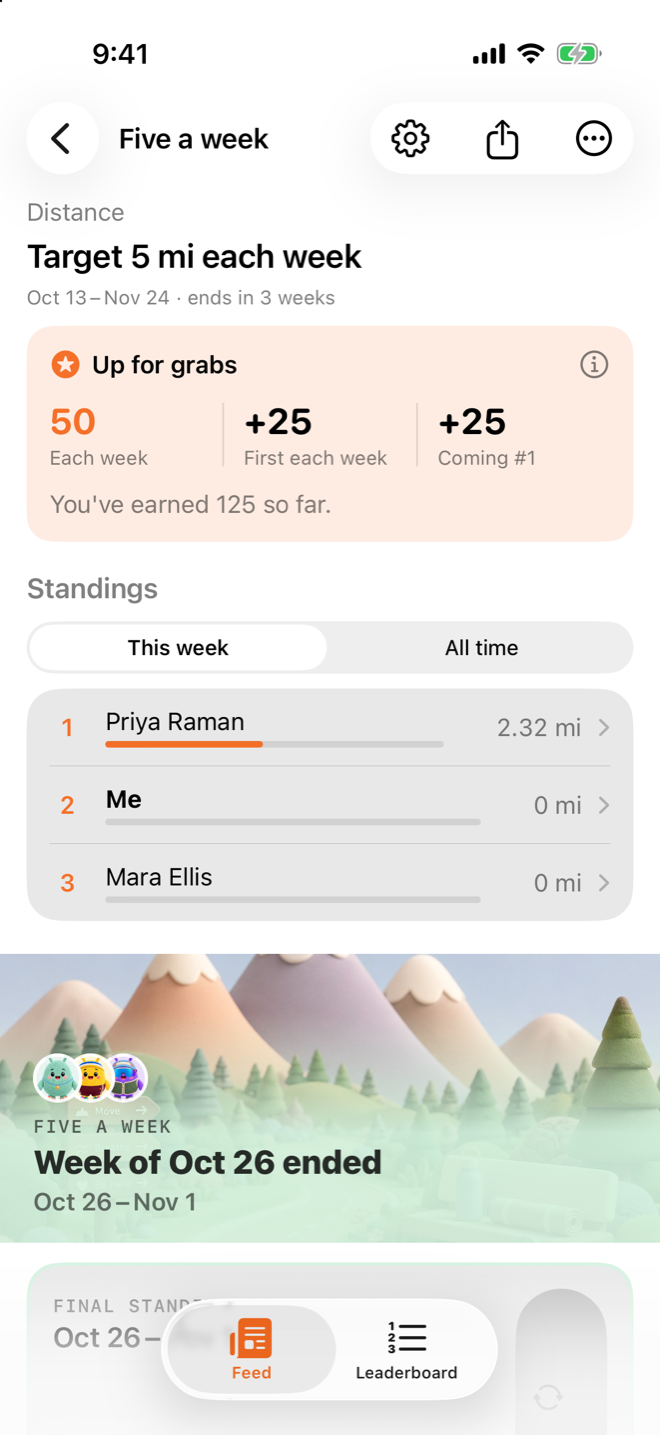
When a week or a day of a recurring challenge ends, its page shows the final standings with a crown for every winner, right under the leaderboard, with that week's workouts folded beneath. A challenge that finishes gets a close-out of its own, and the main Feed shows each one where it happened.
You can also switch the leaderboard between this week and all time with the tabs at its top, and tap anyone's name to see their workouts.
Treadmills, and pads that connect by themselves
Indoor walk now finds standard Bluetooth treadmills, at home or in the gym, as well as walking pads. Pick the machine you're on and Puffin' records your time and distance while you run the belt from its own console.
If you use a walking pad, pick it once and Indoor walk connects to it on its own, like headphones. Saved devices in Settings lists the pads you've used. For setting one up, see how to run a walking pad challenge with friends.
Ask Siri
Ask Siri where you stand in a challenge, how you're doing this week, or to start a walk, run or ride. Starting a workout works from the Action button and the Shortcuts app too.
Somewhere to start
Not in a challenge yet? The Feed now shows your puffin and two buttons: start a challenge and share its code, or join one with a code a friend sent you.
Rest timers and back-to-back workouts on Apple Watch
During a workout, pull down, turn the Digital Crown or Double Tap to start a rest. The screen fills with color and drains as it counts down, with the countdown beside your workout time.
Tap Next on the Watch's controls to save a workout and start another straight away, like a lift into a run. Each one is saved to Apple Health as its own workout, and they reach Puffin' together.
Smaller things and fixes
- Your puffin at the top of the Feed now sits on a circle in your own color, so it's clear you can tap it.
- Puffin' counts a few things, like a challenge being started or joined, to see what's working. What it sends never includes your name, your workouts or anything you write.
- If another app had saved a workout to Apple Health with a calorie reading below zero, Puffin' stopped syncing. It now syncs that workout without the reading.
- A running challenge says how long it has left again, instead of "ends now".
Try it
Update Puffin' from the App Store, then start a challenge and send the link to the people you'd like to move with. Every version is listed on the Releases page.